Best Cheap Gadgets for Learning Electronics at Home
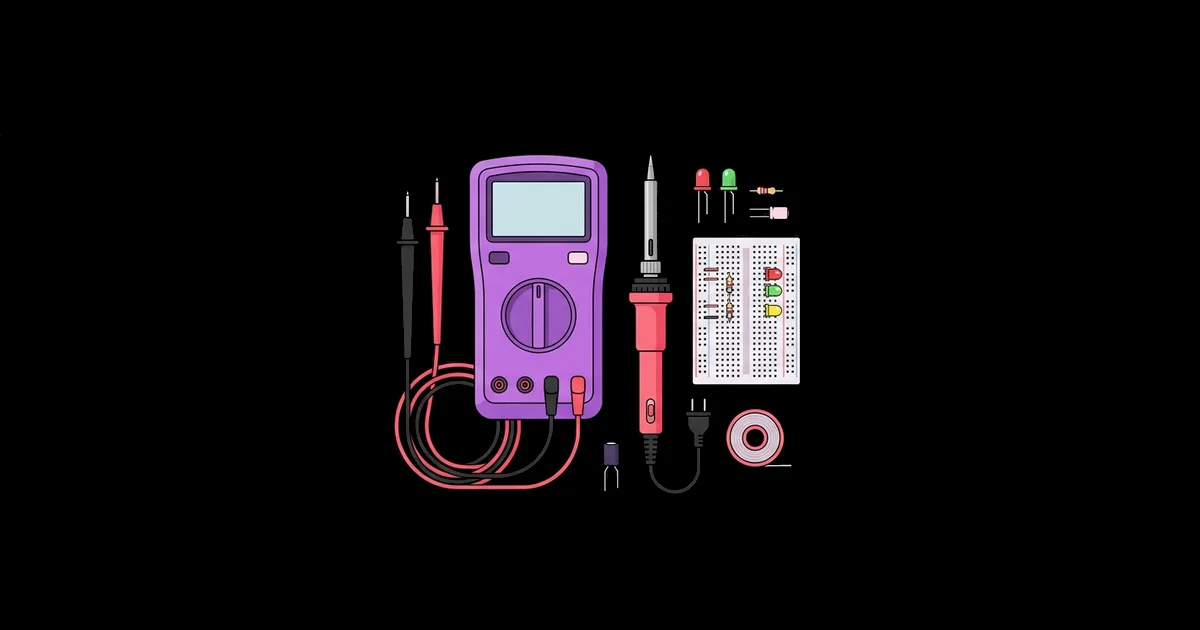
You do not need a lab bench full of expensive instruments to learn electronics properly; you need a handful of the right cheap tools and the discipline to use them. The best cheap gadgets for learning electronics at home are low-cost tools and boards, such as a multimeter, breadboard, component kit, microcontroller, and temperature-controlled soldering iron, that let you build, measure, and debug real circuits safely on a kitchen table.
Quick Answer: The essential cheap gadgets for learning electronics at home are a digital multimeter, a solderless breadboard with jumper wires, an assorted component kit, an Arduino-compatible or Raspberry Pi Pico board, a temperature-controlled soldering iron, and a USB power meter. Together they cover building, measuring, programming, and permanent assembly.
Which Gadgets Actually Matter for a Beginner?
The gadgets that matter are the ones that let you see what a circuit is doing. Electricity is invisible, so beginners who cannot measure voltage and current end up guessing, and guessing is where most frustration comes from. That is why a multimeter comes before almost anything else on this list.
Think of your toolkit in four roles. Building tools let you assemble circuits: a breadboard, jumper wires, and components. Measuring tools tell you what is happening: a multimeter, a USB power meter, and eventually a logic analyzer. Programmable boards add intelligence: an Arduino Uno compatible board or a Raspberry Pi Pico. Assembly tools make projects permanent: a soldering iron, solder, and wire strippers. Once you own the basics, putting them to work on short Arduino builds designed to finish in a weekend is the fastest way to turn tools into skills.
A few definitions help. A solderless breadboard is a plastic board with spring clips connected in rows, letting you plug components together without soldering. A microcontroller is a small computer on a single chip that reads inputs and controls outputs. A logic analyzer captures digital signals over time so you can see communication between chips, such as I2C or SPI data.
Cheap does not mean disposable. Several low-cost tools, particularly multimeters and soldering irons, vary widely in quality, so knowing what to look for matters more than the price itself.
The Core Toolkit, in Buying Order
Buy these in roughly this order. Each one unlocks a new type of project, and none of them is expensive on its own.
- Digital multimeter. Measures voltage, resistance, continuity, and current. Look for auto-ranging, a continuity beeper, and safety category markings. It is the single most important learning tool you will own.
- Breadboard and jumper wire set. A full-size breadboard plus male-to-male, male-to-female, and female-to-female jumpers covers nearly every beginner circuit.
- Assorted component kit. Resistors, LEDs, capacitors, push buttons, transistors, diodes, and a few potentiometers. Kits with labeled compartments save hours of sorting.
- Microcontroller board. An Arduino Uno or compatible board has the most tutorials. The Raspberry Pi Pico is an inexpensive alternative that runs MicroPython, which many beginners find easier than C++.
- Breadboard power module. Plugs into the breadboard and supplies regulated 3.3 or 5 volts from a USB or barrel input, which is safer than wiring batteries directly.
- Temperature-controlled soldering iron. A controllable tip temperature makes soldering far easier than a cheap fixed-temperature iron. Compact USB-C irons such as the open-source Pinecil are popular for home use.
- USB power meter. Plugs inline with a USB cable to show voltage and current. It instantly reveals weak chargers and power-hungry projects.
- Sensor starter pack. Ultrasonic distance, temperature, light, and motion sensors open up interactive projects once the basics are comfortable.
- Logic analyzer. Inexpensive USB analyzers compatible with the free sigrok and PulseView software let you decode digital communication when something will not talk.
Gadget Comparison: What Each Tool Teaches
This table summarizes what each gadget teaches, how urgently you need it, and what to check when buying a budget version.
| Gadget | What It Teaches | Priority | Budget Buying Tip |
|---|---|---|---|
| Digital multimeter | Voltage, resistance, continuity, current | Essential | Choose auto-ranging with a continuity beeper and fused current inputs |
| Breadboard and jumpers | Circuit layout and connections | Essential | Check that clips grip firmly; loose boards cause intermittent faults |
| Microcontroller board | Programming inputs and outputs | Essential | Pick a board with strong tutorial support, such as Uno or Pico |
| Soldering iron | Permanent assembly and repair | High | Insist on adjustable temperature and replaceable tips |
| USB power meter | Power budgets and supply quality | Medium | Look for one that shows voltage and current at the same time |
| Logic analyzer | Digital protocols such as I2C and SPI | Later | Confirm compatibility with sigrok and PulseView before buying |
If your budget allows only three items today, choose the multimeter, a breadboard kit, and a microcontroller. Everything else can wait until a project demands it.
Space matters too. You do not need a dedicated room, but a fixed spot with a heat-resistant mat, good lighting, and a small parts organizer makes it far easier to pick up a project for twenty minutes after work or school. Learners who have to unpack everything each time tend to practice less often, and frequent short sessions build skill faster than occasional marathons.
Practitioner Analysis: Where Cheap Tools Help and Where They Hurt
Having taught electronics to beginners for many years, I can say the cheapest tools are rarely the problem. The problem is cheap tools that fail silently. A multimeter with a dead fuse reads zero current. A breadboard with worn clips makes a perfect circuit behave randomly. A soldering iron that cannot hold temperature produces dull, cracked joints that look connected but are not.
That leads to my core rule: spend a little more on tools that measure or heat, and save on everything else. Components, wires, and sensor boards are cheap and interchangeable. The multimeter and soldering iron are your instruments, and their accuracy and consistency determine whether you can trust what you see.
A second insight is that reuse multiplies the value of a small toolkit. Old phone chargers, USB cables, speakers, and dead electronics are free parts and free practice for desoldering. A multimeter plus a pile of salvaged hardware is a complete curriculum, and this guide to Raspberry Pi projects built from old spare parts shows how far that approach can go.
A third insight concerns where to buy. Generic boards and component kits from marketplace sellers are usually fine, because a faulty resistor or LED costs almost nothing to replace. Instruments are different. A multimeter that misreports voltage or lacks proper input protection can mislead you or fail unsafely, so buy measuring tools from sellers with clear specifications, safety category ratings, and real user reviews. The same logic applies to soldering irons: look for documented temperature ranges and widely available replacement tips, because a tip that cannot be replaced turns the whole iron into a disposable tool.
Finally, the tool that most accelerates learning is not a gadget at all: it is a notebook. Writing down what you measured, what you expected, and what changed turns each failure into a lesson you keep.
Common Mistakes When Buying and Using Budget Tools
These are the mistakes I see most often, along with how to avoid each one.
- Measuring current in the wrong socket. Leaving the probe in the current socket and then measuring voltage can short the circuit and blow the meter's fuse. Return the probe to the voltage socket after every current measurement.
- Buying a fixed-temperature soldering iron. Uncontrolled irons overheat tips and components. An adjustable iron is worth the small extra cost.
- Skipping safety glasses. Clipped leads and spitting flux can reach your eyes. Wear glasses whenever cutting or soldering.
- Soldering without ventilation. Flux fumes are irritating. Work near an open window or use a small fume extractor fan.
- Buying huge kits upfront. Giant kits often contain parts you will not use for months. Start small and buy sensors when projects need them.
- Experimenting with mains power. Household voltage is dangerous. Keep home learning to batteries and low-voltage USB or bench supplies.
- Never checking the multimeter itself. Test the continuity beeper and measure a known battery occasionally to confirm the meter is reading correctly.
Real-World Scenario: A First Month With a Budget Toolkit
Here is how I would structure a beginner's first month using only the core gadgets.
Week 1: Measure everything. Use the multimeter to measure batteries, check resistor values against their color codes, and test cables for continuity. Build a simple LED circuit on the breadboard and measure the voltage across the LED and resistor. This builds intuition for Ohm's law, which relates voltage, current, and resistance.
Week 2: Add a microcontroller. Upload the Blink example to your Arduino or Pico, then control the breadboard LED. Add a button and a potentiometer, and print readings to the serial monitor.
Week 3: Add sensors and power awareness. Connect a temperature or distance sensor. Use the USB power meter to compare current draw with and without the sensor, and with the LED on or off.
Week 4: Solder a permanent project. Practice on a scrap board, then move your favorite circuit to a perfboard. Check every joint with the multimeter's continuity mode before powering it up.
Checklist for the month: you can measure voltage, resistance, and continuity confidently; you have programmed inputs and outputs; you understand how much current your project draws; and you have soldered at least one working permanent circuit.
Key Takeaways
- A digital multimeter is the most important cheap gadget for learning electronics because it makes invisible electricity measurable.
- Spend a little more on tools that measure or heat, such as multimeters and soldering irons, and save on components.
- An Arduino Uno compatible board or a Raspberry Pi Pico provides the best-supported entry point into programmable electronics.
- A USB power meter quickly reveals weak chargers and power-hungry circuits that cause unstable behavior.
- Keeping home electronics learning to low-voltage battery and USB power avoids the serious risks of mains electricity.
Frequently Asked Questions
What is the first gadget to buy for learning electronics?
Buy a digital multimeter first. It lets you measure voltage, resistance, and continuity, which turns guesswork into evidence. Almost every beginner problem, from a dead battery to a broken wire, can be diagnosed with a multimeter, making it the foundation of every other skill.
Is Arduino or Raspberry Pi Pico better for beginners?
Both are excellent. Arduino has the largest library of tutorials and works naturally with 5-volt hobby components. The Raspberry Pi Pico is very inexpensive and runs MicroPython, which many beginners find easier to read. Choose based on which tutorials and language appeal to you.
Do I need a soldering iron to learn electronics?
Not at first. A breadboard lets you build and test circuits without soldering. A soldering iron becomes important when you want permanent projects, repairs, or to attach headers to boards. When you buy one, choose a temperature-controlled model for much easier, safer results.
Are cheap multimeters accurate enough for learning?
Yes, for hobby circuits. Budget multimeters are generally accurate enough for low-voltage learning projects. Prioritize auto-ranging, a continuity beeper, fused current inputs, and clear safety ratings. Check it occasionally against a fresh battery to confirm it is still reading reliably.
What safety gear do I need for home electronics?
Wear safety glasses when cutting leads or soldering, work in a ventilated space, use a soldering iron stand, and keep a heat-resistant mat on your desk. Stick to low-voltage battery and USB power, and never open or modify mains-powered equipment without training.
Can I learn electronics at home without a kit?
Yes. Buy a breadboard, jumper wires, a small component assortment, and a multimeter separately, then follow free online tutorials. Starter kits are convenient because they bundle matching parts with guided projects, but buying individual items lets you focus on exactly what you want to learn.
Conclusion
The decision that shapes your progress most is buying a trustworthy multimeter before anything else, because measurement turns confusion into learning. Pair it with a breadboard, a component kit, and one well-supported microcontroller, and you have a complete home lab for very little money. Start measuring this week. If you are setting this up for a younger learner, the next step is choosing from robotics kits suited to kids and teens, which pair perfectly with these tools as skills grow.