How to Connect MongoDB to a Next.js Application
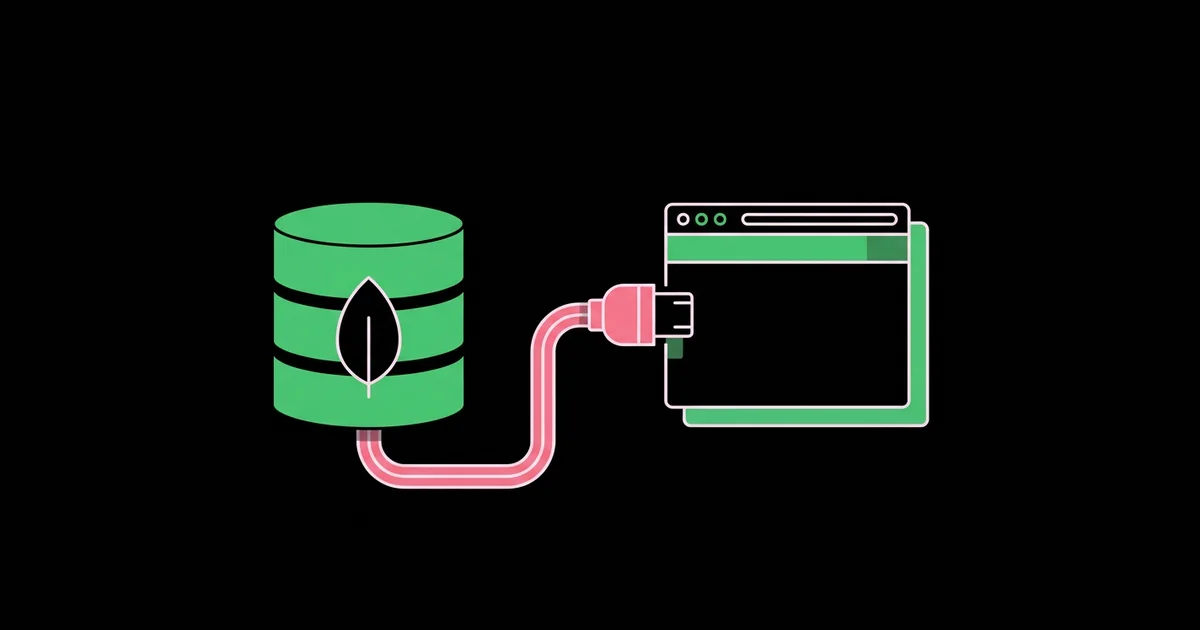
Connecting MongoDB to Next.js takes five minutes to get working and much longer to get right. The classic failure is a connection that works locally, then floods the database with connections during development hot reloads or under serverless traffic in production. Connecting MongoDB to a Next.js application means creating a single reusable MongoDB client on the server, reading its connection string from an environment variable, and querying it from Server Components, Server Actions, or Route Handlers, never from the browser.
Quick Answer: Install the official mongodb driver, store your connection string in MONGODB_URI, create a lib/mongodb.ts module that caches one MongoClient promise on globalThis in development, and import it only in server code such as Server Components, Server Actions, and Route Handlers. Convert ObjectId values to strings before passing data to client components.
Where Should MongoDB Code Live in a Next.js App?
MongoDB code should live exclusively on the server. In the App Router, that means three places: Server Components for reading data while rendering a page, Server Actions for mutations triggered by forms or buttons, and Route Handlers for endpoints that external clients, webhooks, or mobile apps call. The database driver and your connection string must never be imported into a file marked "use client", because client bundles are downloaded by every visitor.
This server-first model is one of the main reasons teams choose a framework over a client-only app. If you are still deciding, our explanation of when Next.js beats a plain React SPA covers why direct server-side data access removes the need for a separate API layer in many projects.
A few terms are worth pinning down. The connection string (a URI beginning with mongodb+srv:// for Atlas) contains the host, credentials, and options. The MongoClient is the driver object that manages a pool of connections. A connection pool is a set of open connections the driver reuses across queries; creating a new client per request defeats it. Mongoose is an optional object data modeling library that adds schemas and validation on top of the driver. You can use either; the connection caching principle is identical.
The official driver is the leaner choice when you want full control and TypeScript types for your documents. Mongoose is helpful when you want enforced schemas, middleware hooks, and model methods, at the cost of an extra abstraction.
Step-by-Step Setup With the Official Driver
The setup has six steps. Follow them in order, and test the connection with a single query before building features on top.
- Create the database. In MongoDB Atlas, create a cluster, add a database user with a strong password, and configure network access for your development machine and hosting provider.
- Copy the connection string. Use the driver connection string from Atlas, insert your user's password, and add the database name if you want a default.
- Set the environment variable. Add
MONGODB_URI=...to.env.localand to your host's environment settings. Do not use aNEXT_PUBLIC_prefix. - Install the driver. Run
npm install mongodb. - Create a cached client module in
lib/mongodb.ts, shown below. - Query from a Server Component and render the result to confirm everything works.
The cached client module:
import { MongoClient } from 'mongodb';

const uri = process.env.MONGODB_URI;
if (!uri) throw new Error('MONGODB_URI is not set');

const globalForMongo = globalThis as unknown as {
  _mongoClientPromise?: Promise<MongoClient>;
};

let clientPromise: Promise<MongoClient>;

if (process.env.NODE_ENV === 'development') {
  if (!globalForMongo._mongoClientPromise) {
    globalForMongo._mongoClientPromise = new MongoClient(uri).connect();
  }
  clientPromise = globalForMongo._mongoClientPromise;
} else {
  clientPromise = new MongoClient(uri).connect();
}

export default clientPromise;
And a Server Component that uses it:
import clientPromise from '@/lib/mongodb';

export default async function ProductsPage() {
  const client = await clientPromise;
  const products = await client.db('shop').collection('products')
    .find({}, { projection: { name: 1, price: 1 } }).limit(20).toArray();
  return (
    <ul>{products.map((p) => <li key={p._id.toString()}>{p.name}</li>)}</ul>
  );
}
The development branch stores the promise on globalThis because hot module reloading re-executes modules on every save. Without the cache, each save opens a new pool, and you quickly hit connection limits. In production, the module is evaluated once per server instance, so a module-level client is reused naturally.
Driver, Mongoose, or a Data API: Which Should You Use?
Your choice of access method shapes your code's structure more than the connection itself. This comparison reflects how each option behaves in typical Next.js projects.
| Approach | Best For | Strength | Watch Out For |
|---|---|---|---|
| Official mongodb driver | Most App Router projects | Lean, fast, full access to every MongoDB feature | No built-in schema enforcement; validate input yourself |
| Mongoose | Teams wanting schemas, hooks, and models | Validation, middleware, and familiar model API | Model recompilation errors during hot reload if not guarded |
| Separate Express or API service | Shared backend used by web and mobile clients | Clear separation and independent scaling | Extra deployment and network hop for every query |
| Hosting marketplace integration | Fast provisioning on managed platforms | Environment variables configured automatically | Still requires the same caching pattern in code |
For Mongoose, guard model definitions with mongoose.models.Product || mongoose.model('Product', schema) to avoid the overwrite error after hot reloads, and cache the connection promise on globalThis exactly as above.
Performance and Reliability: What Matters in Production
Production reliability depends on connection reuse, query shape, and indexes far more than on the driver you choose. The following is practitioner analysis from running MongoDB-backed Next.js apps rather than a formal benchmark.
Connection reuse is the first lever. On serverless platforms, many function instances may run in parallel, each holding its own pool. Keep pool sizes modest with the maxPoolSize option, and monitor the connection count in Atlas during traffic spikes. Platforms that reuse instances across concurrent requests reduce the problem considerably, but the cached module pattern remains essential.
Query shape is the second lever. Always use projections to fetch only the fields a page needs, paginate with limits, and avoid loading entire collections into memory. Fetching fewer fields also shrinks the serialized payload sent from Server Components to the browser.
Indexes are the third lever. Every query used on a hot page should be supported by an index; use the explain output or Atlas Performance Advisor to find collection scans. A single missing index on a frequently filtered field can slow an entire page.
Architecture is the final consideration. When a mobile app or third party also needs the data, a dedicated API can be cleaner than duplicating logic in Next.js. Our tutorial on a standalone Express REST API shows how to structure that service so Next.js can call it alongside other clients.
Common Mistakes and How to Avoid Them
The most frequent mistake is creating a new MongoClient inside a component, action, or route. Each call opens a new pool, and under load the database rejects connections. Always import the shared client promise.
- Passing ObjectId or Date objects to client components. Props crossing the server-client boundary must be serializable. Convert
_idto a string and dates to ISO strings first. - Importing the database module in client code. Add the
server-onlypackage import to your database module so accidental client imports fail at build time. - Opening Atlas to every IP without strong credentials. If your host uses dynamic IPs and you must allow broad access, use long random passwords, least-privilege users, and consider private networking options.
- Trusting form input. Validate Server Action input with a schema library such as Zod, and never pass raw request objects into query filters, which can enable operator injection.
- Forgetting to revalidate after writes. After a mutation, call
revalidatePathor the appropriate tag revalidation so cached pages show fresh data. - Missing the database name. If the URI lacks a default database, pass the name explicitly to
client.db()to avoid writing to the wrong database.
Implementation Walkthrough: A Notes App With Create and List
Here is how the pieces fit together in a small notes feature with a list page and an add-note form.
Data model. Each note document has title, body, userId, and createdAt. Create a compound index on userId and createdAt descending, because the list page filters by user and sorts by date.
Read path. The notes page is a Server Component. It reads the session, then queries notes with a filter on the session's user ID, a projection of title and creation date, a sort by newest, and a limit of fifty. Before rendering any client component, it maps each document to a plain object with a string id and an ISO date string.
Write path. A Server Action receives form data, validates title and body lengths with Zod, checks the session again on the server, inserts the document with the session's user ID rather than any client-supplied value, and calls revalidatePath('/notes').
Delete path. A delete action converts the incoming ID with new ObjectId(id) inside a try block, and its filter includes both _id and userId, so users can only delete their own notes.
Checklist before deploying. Set MONGODB_URI in the production environment, confirm network access from the host, verify the index exists in Atlas, test create and delete with two accounts to confirm isolation, and watch the connection graph during the first day of traffic. This pattern scales from a weekend project to a production SaaS with only incremental changes.
Swapping in Mongoose. If the team prefers Mongoose, the walkthrough barely changes. Replace the client module with a function that calls mongoose.connect once and caches the returned promise on globalThis, define a Note schema with required fields and maximum lengths, and export the model using the mongoose.models.Note || mongoose.model(...) guard. Call .lean() on read queries so they return plain objects instead of full Mongoose documents, which is faster and makes serialization for client components simpler. Keep Zod validation at the action boundary anyway; schema validation inside Mongoose is a second line of defense, not a replacement for rejecting bad input early.
Adding database-level rules. Whichever access method you choose, consider MongoDB's built-in JSON Schema validation on the collection itself. It guarantees that every document written by any service, script, or teammate meets minimum requirements, which protects data quality as the codebase grows and more code paths write to the same collection.
Key Takeaways
- Create one MongoClient per server instance and cache its promise on globalThis during development to survive hot reloads.
- Import database code only in Server Components, Server Actions, and Route Handlers, never in client components.
- Convert ObjectId and Date values to strings before passing documents across the server-client boundary.
- Projections, pagination, and indexes on filtered fields matter more for performance than the choice of driver or ODM.
- Always scope queries by the authenticated user's ID taken from the server session, not from client input.
Frequently Asked Questions
Should I use Mongoose or the MongoDB driver with Next.js?
Use the official driver for lean, flexible access with full TypeScript support, and choose Mongoose when you want schemas, validation, middleware, and model methods. Both work well with the App Router. Whichever you pick, cache the connection on globalThis in development and guard Mongoose models against recompilation during hot reloads.
Why does my Next.js app create too many MongoDB connections?
This usually happens because a new MongoClient is created on every request or every hot reload. Move client creation into a shared module, cache the connection promise on globalThis in development, and import that module everywhere. In serverless environments, also set a reasonable maxPoolSize and monitor connection counts in Atlas.
Can I connect to MongoDB from a client component?
No. Client components run in the browser, so a connection string there would expose your database credentials to every visitor. Query MongoDB in Server Components, Server Actions, or Route Handlers, then pass only the serialized results to client components as props or return them from an endpoint.
How do I fix the "Only plain objects can be passed to Client Components" error?
The error appears when you pass MongoDB documents containing ObjectId or Date instances to a client component. Map each document to a plain object before passing it, converting _id with toString() and dates with toISOString(). Projecting only needed fields also keeps the payload smaller and safer.
Where do I put the MongoDB connection string in Next.js?
Store it in a server-only environment variable such as MONGODB_URI, placed in .env.local for development and in your hosting provider's encrypted environment settings for production. Never use the NEXT_PUBLIC prefix and never commit the value to version control. Read it only inside server code.
Does MongoDB work with Next.js on serverless hosting?
Yes. MongoDB works well on serverless platforms as long as you reuse a module-level client per instance and keep pool sizes modest. Configure Atlas network access for your host, monitor connection counts during traffic peaks, and use indexes and projections so each function invocation finishes quickly.
Conclusion
The one decision that determines whether your MongoDB integration stays healthy is reusing a single cached client from server-only code; get that right and everything else, from Server Actions to Route Handlers, follows naturally. Add projections, indexes, and user-scoped filters from the start. If you plan to run this app on infrastructure you control, your next step is our guide to self-hosting Next.js on a VPS.