
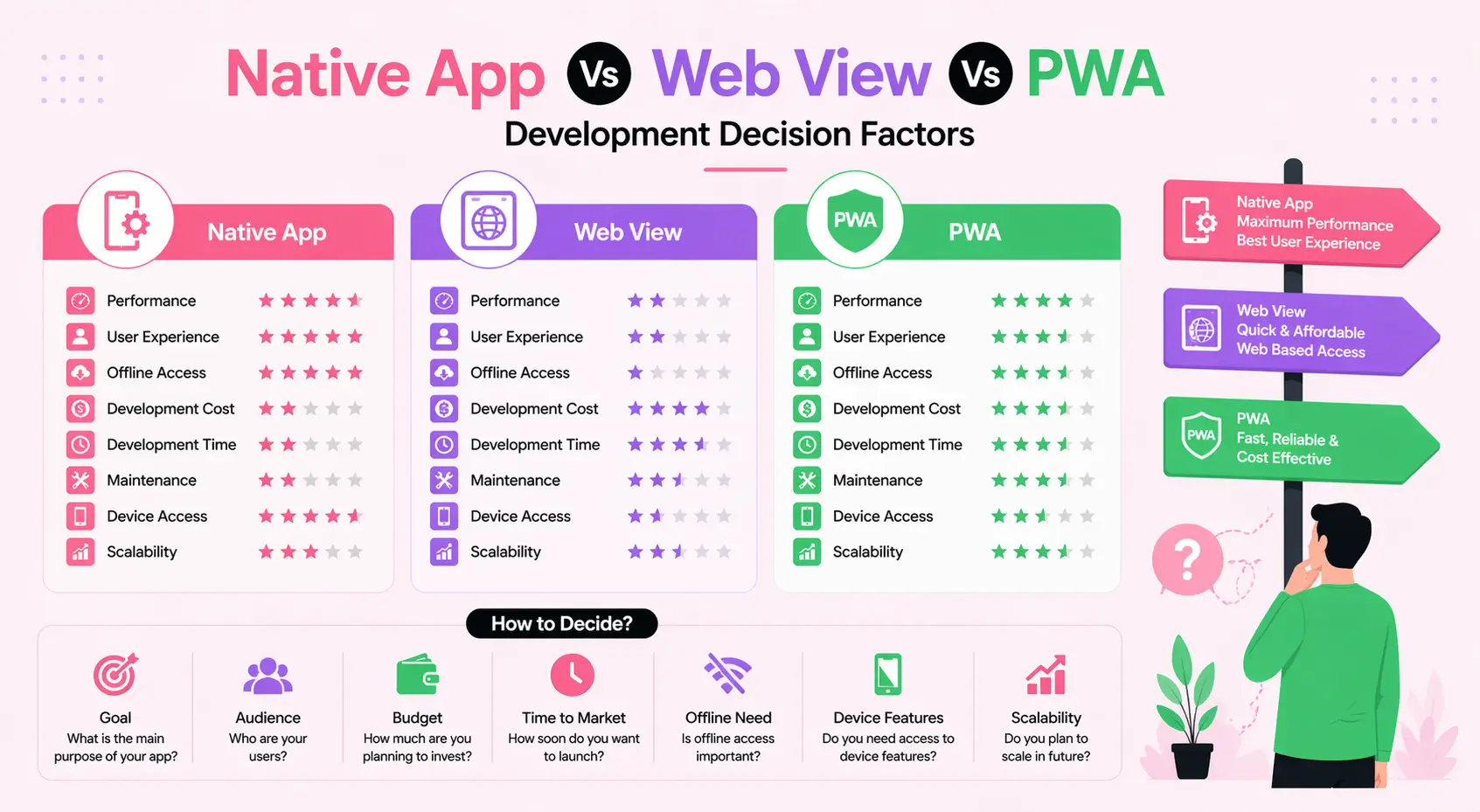
Native App Vs Web View Vs PWA Development Decision Factors: The Complete 2026 Guide
Choosing between Native App vs Web View vs PWA development decision factors is one of the most consequential architectural choices a product team faces today. Get it right, and you build a fast, scalable, cost-effective digital product. Get it wrong, and you spend months rewriting code, fighting performance issues, and losing users to competitors who made smarter technology decisions. Whether you are a startup founder scoping your MVP, an enterprise CTO planning a digital transformation, or a product manager drafting a mobile strategy, this guide delivers every technical, commercial, and strategic factor you need to make the right call in 2026.
The mobile and web landscape has never been more complex. Over 6.9 billion people globally use smartphones. App stores host millions of applications. Progressive Web Apps have quietly matured into production-grade solutions trusted by Google, Twitter, Starbucks, and Pinterest. Meanwhile, hybrid WebView-based frameworks like Capacitor and Ionic continue evolving. There is no single universal answer — only the right answer for your specific product, audience, and business goals.
This article cuts through the noise with deep technical analysis, real-world use cases, comparison tables, decision checklists, and forward-looking trends so you walk away with absolute clarity.
Table of Contents
- What Are the Three Approaches? Definitions Explained
- Native App Development: Benefits, Challenges, and Best Practices
- WebView Development: Benefits, Challenges, and Best Practices
- Progressive Web App (PWA) Development: Benefits, Challenges, and Best Practices
- Head-to-Head Comparison: Native vs WebView vs PWA
- Critical Decision Factors: What Should Drive Your Choice?
- Real-World Use Cases and Industry Examples
- Tools and Technologies Ecosystem in 2026
- Future Trends: What Changes in 2026 and Beyond
- The Ultimate Decision Checklist
- Frequently Asked Questions (FAQ)
What Are the Three Approaches? Definitions Explained
Before diving into decision factors, it is essential to understand exactly what each approach means — not in oversimplified terms, but with the precision required to make informed technical and business decisions.
What Is Native App Development?
A native application is built specifically for one platform — iOS or Android — using that platform's official programming language, SDKs, and development tools. iOS native development uses Swift or Objective-C with Xcode. Android native development uses Kotlin or Java with Android Studio. Native apps run directly on the device's operating system, accessing hardware APIs (camera, GPS, biometrics, NFC, Bluetooth) without any abstraction layer. The result is maximum performance, pixel-perfect UI consistency with platform conventions, and full access to every OS capability the moment it ships.
What Is WebView App Development?
A WebView app — often called a hybrid app — is essentially a web application (HTML, CSS, JavaScript) embedded inside a thin native wrapper. The native shell contains a WebView component: WKWebView on iOS and Android WebView (Chromium-based) on Android. Frameworks like Apache Cordova, Ionic with Capacitor, and older iterations of PhoneGap pioneered this model. The app is distributed through app stores like a native app, but the actual UI and business logic run as web code inside the WebView. Native plugins bridge the gap between web code and device hardware when platform capabilities are needed.
What Is a Progressive Web App (PWA)?
A Progressive Web App is a web application that leverages modern browser APIs — Service Workers, the Web App Manifest, Cache API, Push Notifications API, and others — to deliver app-like experiences directly through the browser. PWAs are installable on the home screen, work offline or on poor networks, receive push notifications, and load nearly instantaneously after the first visit. They are not distributed through app stores (though Google Play now supports TWA-based PWA distribution). PWAs represent a fundamentally browser-native architecture: one codebase, any device, zero installation friction.
Native App Development: Benefits, Challenges, and Best Practices
Key Benefits of Native App Development
- Maximum Performance: Native code compiles directly to machine instructions. There is no JavaScript bridge, no HTML rendering engine, and no abstraction overhead. This matters enormously for graphics-intensive apps, real-time data processing, gaming, and AR/VR experiences.
- Complete Platform API Access: Native developers get first-class, day-one access to every platform capability — HealthKit, ARKit, CarPlay on iOS; Camera2 API, Android Auto, Wear OS on Android. There is no waiting for a plugin community to catch up.
- Superior UX Consistency: Native apps conform naturally to platform design languages — Apple's Human Interface Guidelines and Google's Material Design. Users recognize familiar patterns, gestures, animations, and interaction models without a learning curve.
- Offline-First Architecture: Native apps can implement sophisticated offline data sync, background processing, and local storage patterns that go far beyond what web technologies offer.
- App Store Trust Signals: Being present in the App Store or Google Play confers credibility, discoverability through store search, and familiarity for less tech-savvy users.
- Advanced Security Controls: Native apps can leverage biometric authentication, secure enclave storage, certificate pinning, and OS-level sandboxing in ways that web environments cannot fully replicate.
Challenges of Native App Development
- High Development Cost: Building and maintaining two separate codebases — one for iOS, one for Android — effectively doubles development effort, team size, and cost. Typical native projects require separate specialized engineers for each platform.
- Slower Release Cycles: Every update must pass through App Store review, which can take 24–72 hours on Apple's platform. Server-side bug fixes are impossible without a new submission.
- User Update Friction: Users must actively update apps. Significant portions of your user base may be running outdated versions months after a release.
- Steeper Learning Curve: Swift, Kotlin, Xcode, and Android Studio each require platform-specific expertise that is distinct from general web development knowledge.
- Cross-Platform Code Sharing Limitations: Despite cross-platform tools like React Native and Flutter bridging the gap, true native development does not enable code reuse between platforms.
Native App Development Best Practices
- Follow platform design guidelines (HIG for iOS, Material You for Android) rigorously.
- Implement proper background task management to avoid battery drain.
- Use platform-native navigation patterns — tab bars on iOS, bottom navigation on Android.
- Adopt modular architecture (MVVM, Clean Architecture) for maintainability at scale.
- Integrate crash reporting and performance monitoring from day one (Firebase Crashlytics, Datadog).
- Automate testing with XCTest (iOS) and Espresso (Android) alongside unit tests.
- Plan for App Store optimization (ASO) as part of your distribution strategy.
WebView Development: Benefits, Challenges, and Best Practices
Key Benefits of WebView App Development
- Single Codebase, Multiple Platforms: One web codebase targets both iOS and Android. This dramatically reduces development time and cost, particularly for teams with strong web development expertise.
- Faster Time to Market: Teams can leverage existing web skills (React, Vue, Angular) and ship cross-platform apps without rebuilding from scratch.
- App Store Distribution: Unlike PWAs (without TWA), WebView apps can be listed on the App Store and Google Play, which matters for discoverability and perceived legitimacy in certain markets.
- Easier Content Updates: Since UI logic lives on a remote server or in bundled web assets, many updates can be pushed without app store resubmission (within policy limits).
- Broad Plugin Ecosystem: Capacitor and Cordova offer hundreds of community plugins for accessing native capabilities — camera, geolocation, push notifications, contacts, and more.
Challenges of WebView App Development
- Performance Ceiling: WebView rendering is handled by a browser engine, not native UI primitives. Complex animations, list scrolling, and graphics-heavy interactions suffer noticeably compared to native equivalents.
- Inconsistent WebView Behavior: The Android WebView component varies across OEM manufacturers and Android versions. Ensuring consistent behavior across the fragmented Android ecosystem requires significant QA effort.
- Limited Access to Cutting-Edge APIs: New platform capabilities often require custom native plugin development before they become available to the web layer, creating bottlenecks.
- Larger App Bundle Sizes: WebView apps bundle a web runtime, dependencies, and native shell, often producing larger binary sizes than comparable native apps.
- Perceived "Not Quite Native" Quality: Experienced users often notice the slight latency, inconsistent gestures, and non-standard animations that characterize WebView apps, affecting perceived quality.
WebView Development Best Practices
- Use Capacitor over legacy Cordova — it offers better performance, modern architecture, and active maintenance.
- Minimize JavaScript bridge calls by batching native API interactions.
- Implement a Content Security Policy (CSP) to mitigate injection attacks through the WebView.
- Test extensively on low-end Android devices where performance differences are most pronounced.
- Use hardware-accelerated CSS animations rather than JavaScript-driven animations wherever possible.
- Implement skeleton loading states to mask WebView rendering latency.
Progressive Web App (PWA) Development: Benefits, Challenges, and Best Practices
Key Benefits of PWA Development
- Zero Installation Friction: PWAs are accessed through any browser URL. Users can start using a PWA immediately without visiting an app store, creating an account, or downloading anything. The "Add to Home Screen" prompt is optional, not mandatory.
- Instant Updates: Updates deploy like a website — no app store review, no user action required. All users see the latest version instantly when their Service Worker refreshes.
- Outstanding Discoverability: PWAs are indexed by search engines like any web page. They rank in Google Search, benefit from SEO strategies, and can be found through standard web discovery channels — a massive advantage over native apps buried in crowded app stores.
- Lower Development and Maintenance Cost: One codebase serves all platforms — desktop browsers, mobile browsers, and home screen installations. Web development talent is abundant and cross-functional.
- Offline Capability: Service Workers enable intelligent caching strategies that make PWAs functional on unreliable networks or completely offline — a key requirement for users in emerging markets or intermittently connected environments.
- Linkability and Shareability: PWAs are URLs. They can be shared, bookmarked, linked in emails, and embedded in QR codes. Deep linking is trivial compared to native app deep link infrastructure.
- Smaller Data Footprint: PWAs typically consume far less device storage than native equivalents, an important factor in markets where device storage is constrained.
Challenges of PWA Development
- iOS Limitations: Apple has historically been the biggest obstacle to PWA maturity. While iOS 16.4+ significantly improved PWA support (push notifications, Web Push API), iOS PWAs still cannot access Bluetooth, NFC, in-app purchases, or certain sensor APIs that Android PWAs can.
- No App Store Discovery: Without App Store or Google Play presence (unless submitted as a TWA), PWAs miss the built-in discovery mechanisms and the psychological trust that comes with store listings.
- Background Processing Constraints: Background sync and background fetch are limited compared to native background task APIs. Long-running background operations are not reliably supported.
- Hardware API Gaps: Advanced capabilities like ARKit, Face ID integration, CarPlay, or Bluetooth peripheral communication remain unavailable or unreliable in the PWA environment.
- User Perception: Many users outside technology-forward markets may not recognize or trust "install from browser" prompts, limiting organic home screen adoption rates.
PWA Development Best Practices
- Score 90+ on Google Lighthouse across Performance, Accessibility, Best Practices, and SEO audits.
- Implement a comprehensive Service Worker caching strategy — Cache First for static assets, Network First for dynamic API calls, Stale While Revalidate for semi-static content.
- Create a complete and valid Web App Manifest with multiple icon sizes, theme color, and display mode set to "standalone."
- Test the "Add to Home Screen" flow across iOS Safari and Chrome on Android specifically.
- Use IndexedDB for structured offline data storage beyond simple cache responses.
- Implement Web Push Notifications with clear permission request timing — never prompt immediately on first visit.
- Consider Trusted Web Activities (TWA) for Google Play distribution if app store presence is important to your strategy.
Head-to-Head Comparison: Native vs WebView vs PWA
| Factor | Native App | WebView App | PWA |
|---|---|---|---|
| Performance | Excellent | Moderate | Good (improving) |
| Development Cost | High (2x for iOS+Android) | Medium | Low–Medium |
| Time to Market | Slow | Medium | Fast |
| Platform API Access | Full | Partial (via plugins) | Limited (growing) |
| Offline Support | Excellent | Good | Good |
| App Store Distribution | Yes | Yes | Limited (TWA for Google Play) |
| SEO / Discoverability | Low | Low | High |
| Update Speed | Slow (store review) | Medium | Instant |
| User Installation Friction | High | High | Low |
| Push Notifications | Full support | Full support | Good (iOS 16.4+ required) |
| Monetization Options | Full (IAP, subscriptions) | Full | Limited IAP |
| Maintenance Overhead | High | Medium | Low |
| Ideal Team Skill Set | Swift/Kotlin specialists | Web + native plugin knowledge | Web developers |
Critical Decision Factors: What Should Drive Your Choice?
1. What Is Your Target Audience's Behavior?
User behavior data should be the first input into your decision. If your analytics show that 80% of your target users install apps discovered through app store search (common in gaming, fitness, and social categories), native or WebView distribution may be non-negotiable. Conversely, if your users primarily arrive through search engines, social shares, or email links (common in e-commerce, news, and SaaS), PWA's inherent web nature becomes a major strategic advantage. Analyze where your users come from and where they expect to find you before writing a single line of code.
2. What Are Your Performance Requirements?
Define your performance threshold precisely. Applications requiring sub-16ms frame rendering for smooth animations (e.g., professional video editors, 3D modeling tools, competitive games) have no realistic alternative to native development. Applications with primarily list-based UIs, forms, content consumption, and transactional flows will often be indistinguishable from native when built well as PWAs. Be honest about where your application genuinely falls on this spectrum rather than assuming native performance is necessary.
3. Which Device Capabilities Do You Actually Need?
Create a concrete list of every hardware and OS API your application requires. Then verify which approaches support each one. Many teams assume they need advanced native APIs but, upon analysis, discover their actual requirements are met by modern browser APIs. If your feature list genuinely requires NFC, ARKit, Bluetooth LE peripheral mode, in-app purchases with iOS App Store payment processing, or background audio with lock screen controls, native or WebView with native plugins become necessary. If you need camera access, geolocation, push notifications, and offline storage — PWA handles all of this in 2026.
4. What Is Your Development Budget and Timeline?
Native development for both iOS and Android simultaneously requires either two specialized teams or a significantly longer sequential development timeline. For early-stage startups and companies validating product-market fit, the cost differential is decisive. A well-built PWA can go from concept to production in a fraction of the time and budget of a dual-platform native application, allowing faster learning cycles. If resources are constrained, PWA-first followed by native development once product-market fit is confirmed is a commercially rational sequencing strategy.
5. How Frequently Will Your Application Change?
Applications with high release velocity — frequent feature additions, A/B testing, content changes, business logic updates — benefit enormously from PWA's instant deployment model. A product team running weekly deployments finds the App Store review cycle a genuine bottleneck. Applications with stable, infrequent updates suffer less from native's slower release cadence. Consider your product roadmap's cadence when evaluating deployment friction as a real cost.
6. What Markets Are You Targeting?
Geography matters profoundly. In emerging markets (South Asia, Southeast Asia, Sub-Saharan Africa, Latin America), users often have low-storage, low-RAM Android devices on unreliable mobile data connections. PWAs — with their minimal storage footprint, aggressive caching, and zero-install model — frequently outperform native apps in these contexts. This is why Pinterest rebuilt as a PWA specifically for these markets and reported dramatic improvements in engagement. In high-income markets with flagship devices and reliable 5G, performance differences between approaches narrow considerably.
7. What Are Your Monetization Requirements?
If your business model relies on in-app purchases or subscription billing through Apple's App Store payment system, you need a native or WebView app distributed through the App Store. Apple does not permit PWAs to use its in-app purchase APIs. If your monetization is subscription-based with external payment processing (Stripe, etc.), or advertising-based, or transactional e-commerce through the web, PWA has no monetization disadvantage.
8. Cross-Platform Alternatives: Where Does React Native and Flutter Fit?
This article focuses on the three primary architectural approaches, but it is worth acknowledging that React Native and Flutter occupy a distinct fourth category: cross-platform native frameworks. These compile to native UI components or use their own rendering engine (Flutter's Skia/Impeller), delivering near-native performance from a single codebase. For teams that need genuine native-quality experiences without the cost of two separate native codebases, these frameworks are often the best compromise. They are distinct from WebView apps and should be evaluated separately when your requirements exceed PWA capabilities but your budget cannot support full dual-native development.
Companies like WEBPEAK, a full-service digital marketing company providing Web Development, Digital Marketing, and SEO services, advise clients to evaluate these decision factors systematically rather than defaulting to whichever approach is trendiest at the time.
Real-World Use Cases and Industry Examples
When Native App Development Wins
- Mobile Gaming: Games like Candy Crush, PUBG Mobile, and Monument Valley require native rendering pipelines, GPU access, and real-time physics engines. WebView or PWA cannot compete.
- Augmented Reality Applications: Apps using ARKit (iOS) or ARCore (Android) for spatial computing, furniture placement (IKEA Place), or medical visualization require native platform SDKs.
- Health and Fitness Tracking: Applications integrating with Apple HealthKit, Google Fit, wearables, or continuous heart rate monitoring need native BLE access and background execution privileges.
- Financial Trading Platforms: High-frequency data visualization, biometric authentication, and regulatory-compliant security implementations (secure enclave storage) favor native development.
- Enterprise Mobility Management: Corporate applications requiring MDM integration, certificate-based authentication, and deep OS policy compliance need native implementations.
When WebView App Development Wins
- Content-Heavy Corporate Apps: Internal portals, intranet apps, and employee-facing tools that already have a robust web frontend can be wrapped in a WebView shell for app store distribution with minimal additional investment.
- Rapid Prototyping for App Store Distribution: When time-to-store-listing matters more than peak performance and the team is web-first, Capacitor-based WebView apps provide the fastest path to an App Store presence.
- Apps with Existing Web Codebases: Organizations with mature React or Angular web applications can wrap them in a Capacitor shell rather than rebuilding natively from scratch.
When PWA Development Wins
- E-commerce: Alibaba rebuilt its mobile web experience as a PWA and reported a 76% increase in conversions. Flipkart's PWA "Flipkart Lite" drove dramatic re-engagement in India's bandwidth-constrained market.
- Media and Publishing: The Washington Post, Forbes, and The Guardian all operate high-performance PWAs that load faster than their native apps on equivalent networks, improving ad revenue and reader retention.
- SaaS Dashboards and Productivity Tools: Applications where users primarily work from desktops but need occasional mobile access benefit from PWA's single-codebase approach that serves all contexts equally well.
- Emerging Market Products: Twitter Lite (a PWA) reduced data consumption by 70% compared to the native app and became the primary interface for users in Africa and Asia.
- Food Ordering and Delivery: Starbucks' PWA is 99.84% smaller than their iOS app, works offline for menu browsing, and loads in under a second on 2G connections.
Tools and Technologies Ecosystem in 2026
Native App Development Tools
- iOS: Swift 6, SwiftUI (declarative UI framework), Xcode 16, TestFlight for beta distribution, Instruments for performance profiling.
- Android: Kotlin Multiplatform, Jetpack Compose (declarative UI), Android Studio Hedgehog, Firebase Test Lab.
- Cross-Platform Native: React Native 0.74+ (New Architecture with JSI bridge), Flutter 3.x (Impeller rendering engine), Kotlin Multiplatform Mobile (KMM) for shared business logic.
WebView / Hybrid App Development Tools
- Capacitor 6: The modern standard for WebView-based hybrid apps, replacing Cordova as the primary choice for teams using Ionic Framework or standalone web applications.
- Ionic Framework 8: UI component library optimized for hybrid mobile development with native-feeling UI components across platforms.
- Tauri Mobile: Emerging Rust-based framework gaining traction for lightweight, secure WebView applications on mobile.
PWA Development Tools
- Workbox 7: Google's Service Worker library for sophisticated caching strategies with minimal boilerplate.
- Vite PWA Plugin: The most widely adopted PWA build tool integration for Vite-based projects in 2026.
- Next.js with next-pwa: Server-side rendered PWAs with excellent SEO characteristics, popular for e-commerce and content applications.
- Google Lighthouse: Audit tool measuring PWA compliance, performance scores, accessibility, and SEO simultaneously.
- Bubblewrap: Google's CLI tool for wrapping PWAs into Trusted Web Activities for Google Play distribution.
Testing and Monitoring Tools Across All Approaches
- Appium: Cross-platform mobile testing automation for native, WebView, and hybrid apps.
- Detox: Gray-box end-to-end testing framework optimized for React Native.
- Playwright: Full web and PWA testing including Service Worker inspection and offline scenario simulation.
- Firebase Performance Monitoring: Real-time performance data across native, hybrid, and PWA applications.
- Sentry: Cross-platform error tracking and performance monitoring unified across web and mobile.
Future Trends: What Changes in 2026 and Beyond
The Web Capabilities API Gap Is Closing
The Project Fugu initiative — Google's long-running effort to bring native-level capabilities to the web platform — has accelerated dramatically. In 2026, PWAs running on modern Chrome and Edge can access Bluetooth peripherals via the Web Bluetooth API, communicate with USB devices via WebUSB, read and write files directly via the File System Access API, and interface with NFC tags via the Web NFC API. Each new capability closes the gap between PWA and native, and this trajectory will continue through 2027–2028.
iOS Is Becoming More PWA-Friendly (Reluctantly)
Following regulatory pressure from the EU's Digital Markets Act — which forced Apple to allow third-party browser engines on iOS in Europe — the competitive dynamics around iOS PWA support are shifting. While Apple has resisted full PWA parity historically, the combination of regulatory pressure and developer demand is producing measurable improvements in iOS Safari's PWA feature support with each iOS release. Web Push, already shipped in iOS 16.4, was a landmark change, and more capabilities are following.
AI-Powered Development Tools Accelerate All Three Approaches
GitHub Copilot, Cursor, and specialized AI coding assistants have dramatically reduced the marginal cost advantage of the "simpler" approaches. Writing native Swift or Kotlin is faster than it was two years ago when AI can generate boilerplate, suggest platform idioms, and explain API documentation on demand. This partially erodes the cost-of-expertise argument in favor of web-based approaches, though deep platform knowledge still commands a premium for complex implementations.
WebAssembly Transforms PWA Performance
WebAssembly (WASM) is enabling PWAs to run computationally intensive code at near-native speeds. In 2026, WASM-based PWAs are increasingly competitive with native for image processing, video editing, audio worklets, and complex data visualization. Adobe Photoshop's web version, powered by WASM, is the most prominent example of a formerly unimaginable use case becoming viable for PWA architecture.
Micro-Frontend Architectures Enable Hybrid Strategy
Organizations are increasingly adopting a hybrid strategic position: a native shell app that hosts PWA-based micro-frontends for content sections that change frequently, while core experiences that require native performance are implemented natively. This architectural pattern combines the deployment velocity of PWA with the performance ceiling of native and is being adopted by major e-commerce platforms and media companies in 2026.
App Store Policy Evolution
Google Play's openness to TWA-distributed PWAs is increasing. The Google Play Store in 2026 accepts high-quality PWAs meeting Lighthouse score thresholds, giving PWAs genuine app store discoverability without requiring a native wrapper. Apple's App Store policies around WebView apps continue to tighten, with stricter quality review for apps that are essentially thin native wrappers around web content — making quality-first hybrid development more important than shortcut-oriented WebView wrapping.
The Ultimate Decision Checklist
Choose Native App Development If:
- Your app requires real-time graphics, gaming, or AR/VR capabilities
- You need full access to platform-specific APIs (HealthKit, ARKit, BLE peripheral mode)
- In-app purchases via App Store payment are central to your business model
- Your budget supports two specialized mobile engineering teams
- App store discoverability is your primary acquisition channel
- You are building for a performance-sensitive domain (fintech trading, professional creative tools)
- Long-term, you plan to deeply integrate with the platform ecosystem (CarPlay, watchOS, Widgets)
Choose WebView App Development If:
- You have an existing, mature web application and need app store presence quickly
- Your team is primarily web developers without native mobile expertise
- Your application is content-heavy with moderate interaction complexity
- You need app store distribution but cannot justify native development costs
- Your primary users access your product through both web and mobile in similar proportions
- You need Cordova/Capacitor plugin access to specific native APIs your PWA cannot reach
Choose PWA Development If:
- SEO and organic web discovery are important to your acquisition strategy
- You are targeting emerging markets with device/connectivity constraints
- Rapid deployment and continuous updates are business requirements
- You need a cross-platform solution (desktop and mobile) from one codebase
- Installation friction is a barrier to your conversion funnel
- Your monetization model does not depend on App Store in-app purchases
- Your feature requirements are met by modern browser APIs
- You want the lowest total cost of ownership over a 2–3 year product lifecycle
Frequently Asked Questions (FAQ)
Is a PWA better than a native app in 2026?
Neither is universally better — each is optimal for different use cases. PWAs offer lower cost, instant updates, better SEO, and zero installation friction, making them excellent for e-commerce, media, SaaS, and content-driven applications. Native apps remain superior for performance-intensive applications (gaming, AR/VR), applications requiring exclusive platform API access, and products where App Store distribution and in-app purchase monetization are non-negotiable. The "better" choice depends entirely on your specific performance requirements, business model, budget, and target audience.
What is the main difference between a WebView app and a PWA?
The fundamental difference is distribution and runtime. A WebView app is distributed through app stores (App Store, Google Play) as a native app shell that renders web content inside a browser engine component. A PWA is accessed through a web browser URL and runs directly in the browser — no app store required. WebView apps can call native device APIs through a JavaScript bridge (via Capacitor or Cordova plugins). PWAs rely exclusively on what the browser exposes through Web APIs. Both use HTML, CSS, and JavaScript for UI logic, but their deployment model, distribution channel, and native capability access differ significantly.
Can PWAs send push notifications on iOS?
Yes, since iOS 16.4, PWAs installed to the home screen via Safari can receive Web Push notifications on iPhone and iPad. This was a landmark change in Apple's PWA support. However, there are constraints: the PWA must be installed to the home screen (not just opened in Safari), notification permission must be explicitly requested, and the behavior can differ slightly from native push notifications. Push notification support on Android PWAs has been robust for several years and is functionally equivalent to native app push in most scenarios.
Which approach has the best performance — native, WebView, or PWA?
Native apps deliver the highest ceiling performance because they render through native UI primitives and compile to machine code. WebView apps introduce a rendering layer (the browser engine within the native wrapper) that creates a performance ceiling below native. PWAs running in a modern browser are generally faster than WebView apps because they use the system's optimized browser rather than an embedded WebView component. The practical performance gap between a well-built PWA and a native app has narrowed significantly in 2026, and for most standard application use cases (forms, lists, content, transactional flows), the difference is imperceptible to users.
How much cheaper is PWA development compared to native app development?
Development cost differences vary based on project scope and team composition, but PWA development is typically 40–70% less expensive than building equivalent dual-platform native applications. The savings come from a single codebase serving all platforms, leveraging a larger pool of web development talent (generally less expensive than specialized native engineers), elimination of app store submission overhead, and faster iteration cycles. For ongoing maintenance, PWAs are often 50–60% less expensive due to the single codebase and instant deployment model. These cost advantages make PWA a compelling default starting position for budget-conscious product teams.
Is React Native a WebView app?
No. This is a common misconception. React Native is a cross-platform native framework — it compiles to native UI components on both iOS and Android. When you write a React Native component, it renders as a real UIView on iOS and a real View on Android, not inside a WebView browser engine. The JavaScript business logic runs on a separate thread and communicates with the native layer through React Native's bridge (or the newer JSI in the New Architecture). React Native performance is substantially closer to native than WebView-based hybrid apps. It belongs in its own category alongside Flutter as a cross-platform native framework.
When should a company switch from PWA to native app?
Consider migrating from PWA to native when one or more of the following conditions emerge: your application genuinely requires device hardware APIs the Web API ecosystem cannot provide (ARKit, advanced BLE, Apple HealthKit deep integration); your user research reveals that users expect and prefer app store installation (common in gaming, fitness, and social categories); your business model requires App Store in-app purchases and subscription billing; your user base's device and OS distribution warrants platform-specific investment; or your product roadmap includes deep OS integrations (widgets, lock screen complications, CarPlay/Android Auto) that are exclusive to native development. The PWA-first, native-later sequencing is a validated strategy: validate product-market fit cheaply with PWA, then invest in native once you have proven demand.


