How to Repurpose an Interview for Social Media: Turn One Recording Into Weeks of Content
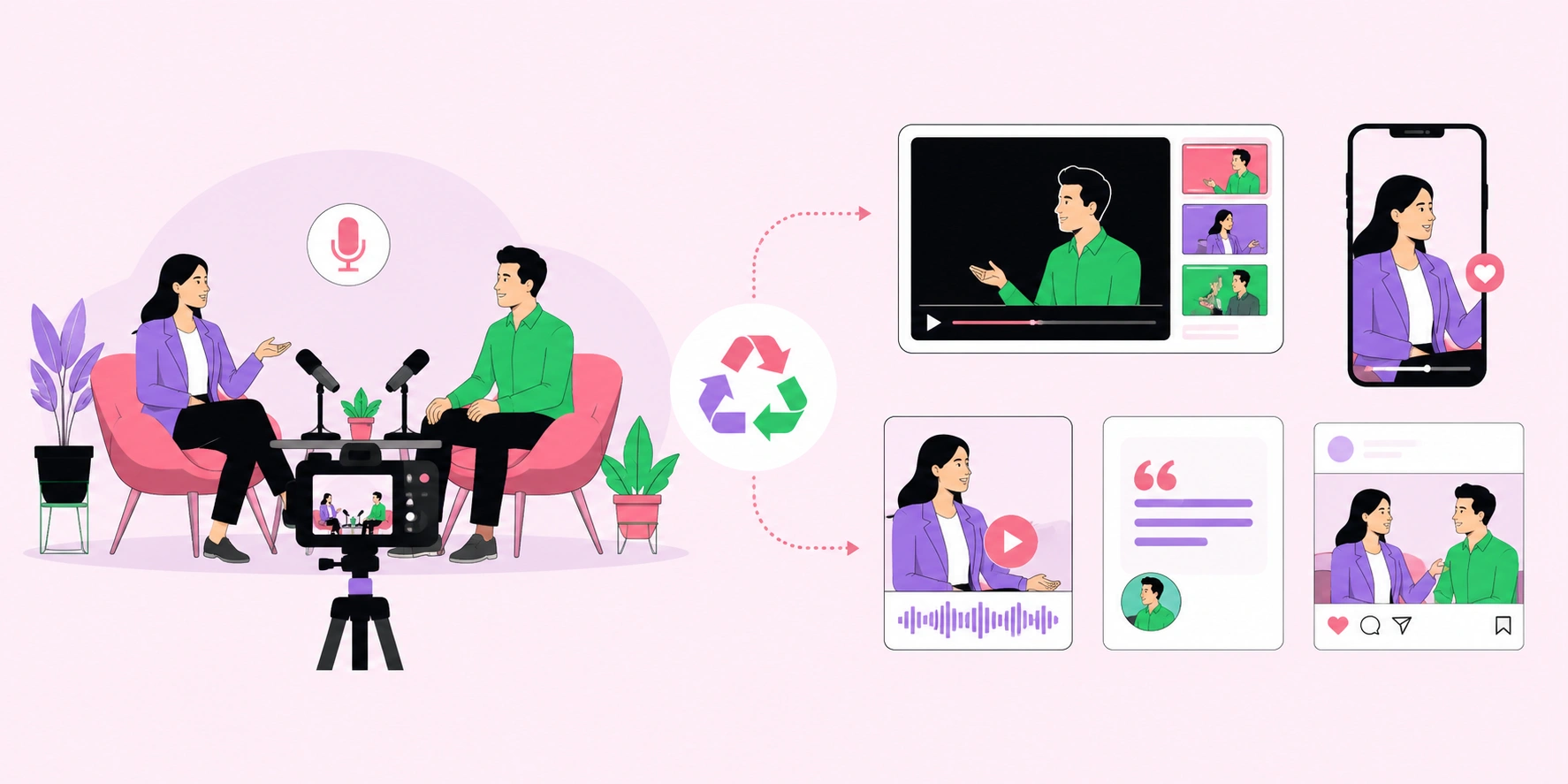
Repurposing an interview for social media means breaking a single long-form conversation, podcast, or video into dozens of smaller, platform-native pieces such as short clips, quote graphics, audiograms, and carousels. A one-hour interview contains enough raw material for four to six weeks of daily posts across multiple channels. Most creators record valuable interviews and then let them sit as a single unwatched long video. This guide shows you the exact workflow to extract, edit, and distribute that content so every minute of your recording earns maximum reach and engagement.
Quick Answer: To repurpose an interview for social media, transcribe the recording, identify 8-12 standout moments, cut them into vertical short clips with captions, design quote graphics and carousels from key insights, create audiograms for audio platforms, and schedule everything across a multi-week content calendar.
How WebPeak Helps You Repurpose Interview Content
Turning one interview into weeks of assets takes editing skill, design work, and copywriting hours most teams cannot spare. WebPeak offers video production and editing services that transform raw interviews into polished, captioned short clips ready for Reels, Shorts, and TikTok. Their content writing services also craft scroll-stopping captions, pull-quotes, and carousel copy from your transcript, so a single recording becomes a complete, ready-to-publish content library without the internal workload.
What Content Formats Can You Create From One Interview?
A single interview is a content goldmine when you know which formats to extract. "Repurposing" simply means adapting existing content into new formats for different platforms and audiences. From one recording you can realistically produce:
- Short vertical clips: 30-60 second highlights for Reels, Shorts, and TikTok.
- Quote graphics: striking one-liners designed as static images.
- Carousels: multi-slide breakdowns of a key idea or framework.
- Audiograms: waveform-animated audio snippets for LinkedIn and X.
- Blog article: the full transcript edited into a written piece for SEO.
- Email newsletter: a summary with the top three takeaways.
This multi-format approach means the same insight reaches people whether they prefer watching, reading, or listening, dramatically expanding your total audience from one effort.
What Is the Step-by-Step Process to Repurpose an Interview?
A repeatable workflow turns repurposing from a chore into a fast production line. Follow these steps in order for the best results:
- Transcribe the full recording using an AI transcription tool for a searchable text base.
- Highlight standout moments — mark 8-12 quotes, stories, or insights that stand alone.
- Clip the video around each moment, keeping each cut tight and self-contained.
- Add captions and branding since most social video is watched on mute.
- Design static assets like quote cards and carousels from the strongest lines.
- Write platform-specific captions tailored to each channel's tone.
- Schedule and distribute across a multi-week calendar to avoid audience fatigue.
Batch each step across all clips at once rather than finishing one clip start to finish. Batching similar tasks cuts production time significantly.
Which Platforms Are Best for Repurposed Interview Content?
Platform-format fit determines whether your repurposed content performs or flops. Each network rewards a specific format and length, so match your assets accordingly rather than posting identical content everywhere. The comparison below maps common interview-derived formats to their ideal platforms and goals.
| Format | Best Platform | Primary Goal |
|---|---|---|
| Vertical short clip | TikTok, Reels, Shorts | Reach and new-audience discovery |
| Quote graphic | Instagram, X | Shareability and engagement |
| Multi-slide carousel | Instagram, LinkedIn | Saves and deeper education |
| Audiogram | LinkedIn, X | Thought leadership |
| Full blog article | Website | SEO and long-term traffic |
Why Does Repurposing Outperform Creating New Content?
Repurposing is more efficient and often more effective than constantly creating from scratch. Research on content marketing consistently shows that repurposing is one of the top strategies marketers use to scale output, with many industry surveys reporting that over 60% of marketers repurpose content regularly. Additionally, studies on message retention suggest audiences need to encounter an idea multiple times before it sticks, so resurfacing the same insight in different formats reinforces rather than bores. The original insight many creators overlook is that repetition across formats builds authority: when your audience sees the same expert take as a clip, a quote, and a carousel, it signals depth and consistency rather than redundancy. One strong interview, fully repurposed, positions you as a subject authority far more effectively than a dozen shallow, one-off posts.
Key Takeaways
- A single one-hour interview can produce four to six weeks of multi-platform content.
- Transcribe first, then extract 8-12 standalone moments before editing anything.
- Over 60% of marketers repurpose content regularly because it scales output efficiently.
- Match each format to its ideal platform rather than cross-posting identical content.
- Repurposing the same insight across formats builds authority through reinforced repetition.
Frequently Asked Questions
How many posts can I get from one interview?
A one-hour interview can realistically generate 20-40 individual posts, including short clips, quote graphics, carousels, audiograms, a blog article, and a newsletter. The exact number depends on how many strong, standalone moments the conversation contains. Aim for 8-12 core highlights and expand each into multiple formats.
What is the best tool to repurpose interview videos?
AI-powered tools that auto-transcribe and identify highlights speed up the process significantly, while standard video editors add captions and branding. The best setup combines a transcription tool, a clip editor for vertical video, and a design tool for static assets. Choose tools that export platform-native aspect ratios.
Should I add captions to repurposed interview clips?
Yes, always add captions. The majority of social video is watched on mute, so on-screen text is essential for retention and accessibility. Captions also boost watch time and reach because viewers can follow along instantly without sound, which the algorithm rewards with wider distribution.
How far apart should I schedule repurposed posts?
Space repurposed clips from the same interview several days apart to avoid audience fatigue. Publishing one core piece every one to two days across a multi-week calendar keeps your feed fresh. Mixing formats between posts also prevents followers from feeling they are seeing the same content repeatedly.
Can I repurpose an old interview or only new ones?
You can absolutely repurpose old interviews. Evergreen insights stay valuable for years, and older recordings often reach an entirely new audience that never saw the original. Review your archive, pull timeless moments, refresh the editing and captions, and redistribute them as if they were brand new.
Conclusion
The most important shift is to stop treating an interview as a single deliverable and start treating it as raw material for an entire content system. Your next step is simple: take your most recent interview, transcribe it today, and mark eight standout moments to clip this week. Creators who master repurposing consistently outproduce and outrank those who chase new content daily, because they extract full value from every conversation they capture.